Task Controlling
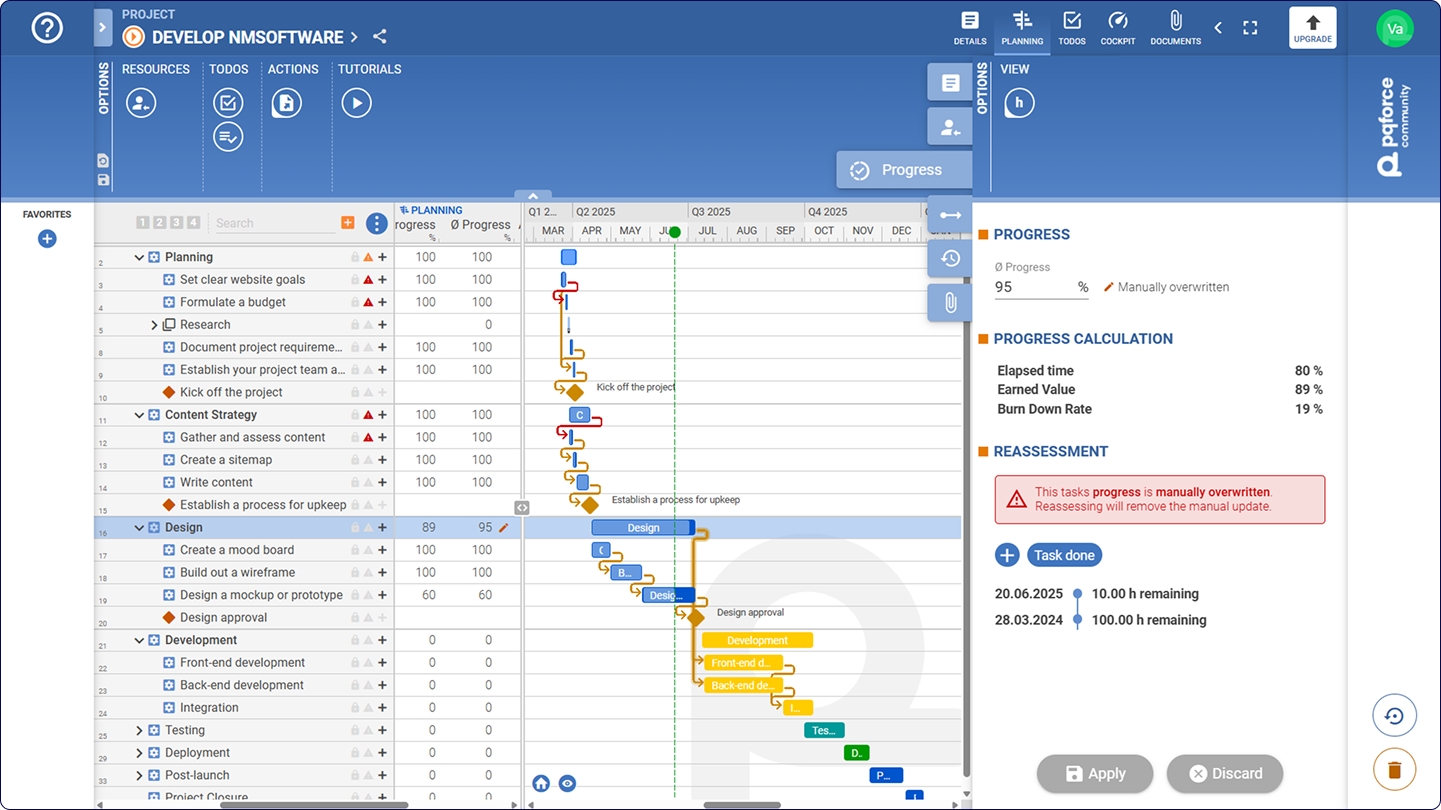
In PQFORCE, a project is structured using a hierarchy of tasks and subtasks known as the Work-Breakdown Structure (WBS). Resources are assigned to these tasks via allocations, which define how much work a resource is expected to perform over a given time period. As the project progresses, actual efforts are recorded in the system to continuously track and evaluate task progress.
Automatically calculated Task Progress
Progress is typically calculated automatically based on task duration and elapsed time. This calculation is reflected in the Burn Down Rate, which indicates the ratio of time elapsed to total allocated time. Automatically generated progress is marked with a Calculator symbol.
Manually overwritten Task Progress
Calculated progress can also be manually overwritten by editing the task cell in the Ø Progress column within the Gantt Planning table, or in the task’s Progress tab under the Progress section. Manually entered values are indicated with a Pencil icon for transparency and display the originally calculated values on mouseover. These changes are purely visual and do not impact the underlying system logic or calculations, including workload visualisations.
Effort vs. Time-driven Tasks
In PQFORCE, tasks are categorized into two types based on the allocation value selected: effort-driven or time-driven.
Effort-driven tasks
Allocations that create effort-driven tasks are based on absolute values such as hours or days and focus on delivering a defined amount of work, with workloads adjusting dynamically if task dates change. Tasks using this model can be reassessed and, in editions higher than PQFORCE Smart, are influenced by recorded Actuals.
Time-driven tasks
Allocations that create time-driven tasks are relative to resource availability over time (e.g., as a percentage). The focus is on completing the work by a fixed end date, with total effort adjusting automatically if that date changes. Progress is tracked automatically as time passes.
Note: A task is considered time-driven as soon as at least one allocation is defined using relative effort. Only when all allocations are in absolute effort, the task is effort-driven.
Manual Reassessment of a Task
For more targeted updates, the Progress tab of a task offers a dedicated interface for progress reassessment. Clicking the plus icon opens a dialog where the new remaining effort or current progress (in %) can be entered, along with an optional comment. After saving, the progress or remaining effort is recalculated, and the reassessment is logged.
Note: If a reassessment is performed, any previously manually entered progress will be overwritten, and a warning is displayed.
A manual reassessment updates system data and calculations that are reflected in the workload histogram. However, each reassessment entry can be removed by dragging it to the bin.
Tasks can also be marked as complete at any time by using the Task done option, which sets progress to 100% immediately.
Actuals in progress tracking fo Effort-driven Tasks
This section is available only for editions higher than PQFORCE Smart
Reassessment can only be done for ongoing effort-driven tasks. It is not possible for tasks that lie completely in the past or future, lack allocations, or are time-driven. For such tasks, progress is based solely on elapsed time but may still be manually overridden.
If no actual efforts have been reported for an ongoing effort-driven task, PQFORCE estimates the progress using provisional efforts, assuming that work has been performed as planned. These provisional efforts are also calculated for the period between the last actual report and today’s date, with each resource’s last report date considered.
Once actuals are recorded, PQFORCE automatically replaces provisional efforts with the reported actuals. This ensures that the actual work progress is reflected as accurately as possible, enabling timely adjustments to project schedules and resource planning.